A Cricut is a desktop cutting machine: you design on a phone or computer, and a small blade cuts the shape out of vinyl, iron-on, cardstock and more. For artists it turns drawings into stickers, stencils, decals and cards. The hard part is choosing a model, because the names (Joy, Joy Xtra, Explore, Maker) do not tell you what each one cuts.
Research-based, not hands-on tested. Every spec below is Cricut’s own, read from its product listings on the date in the “checked” note; I only link the model I recommend. I have not cut materials or timed projects. My method.
The short answer
- Most beginnersCricut Explore 5. A full 12-inch cutting width and the everyday craft materials, without paying for thick-material tools you may never use.
- Only small cards, labels and decalsa Joy machine is smaller, cheaper and simpler.
- Wood, leather, chipboard or engravinggo straight to the Maker line.
How I chose
- What you will cut. Vinyl, iron-on and cardstock cover most first projects; thick materials are a separate class.
- Cutting width. It decides the largest decal or shirt design you can cut in one piece.
- Tools and functions. Writing, scoring and foil add project types; engraving and debossing are Maker features.
- What is in the box. Bundles with materials save a second shopping trip; I looked at what each includes.
- Software. All current models use Cricut’s free Design Space app.
The machines side by side
All figures are Cricut’s, from its listings.
| Machine | Cutting width | Materials (per Cricut) | Notable |
|---|---|---|---|
| Joy 2 | 4.5 in (11.4 cm) | 75+ | Ultra-compact; writes, draws, foils, scores; Print Then Cut |
| Joy Xtra | Wider than Joy, narrower than 12 in | 50+ | Compact; Print Then Cut for full-color stickers |
| Explore 5 | 12 in (30.5 cm) | 100+ | Cuts, writes, draws, foils, scores; six tools; Print Then Cut |
| Maker 4 | 12 in | 300+ incl. leather and wood | Adds engraving, debossing, perforating |
| Maker 5 | 12 in | 300+, up to 3 mm thick | 13 tools; engraves metal and acrylic up to 3 mm |
My pick
 Research-based
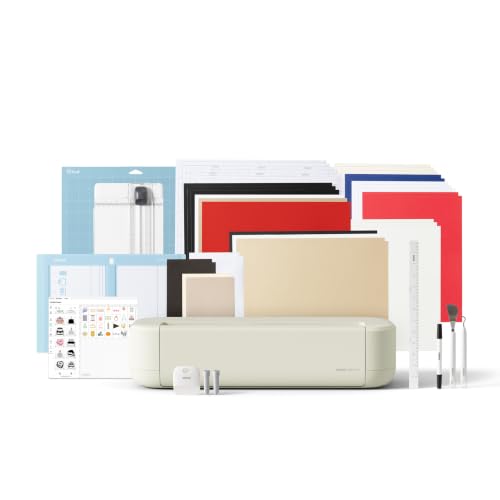
Cricut Explore 5 Essential Bundle
Best for most beginners
Paid link · I may earn from it
- Cutting width
- 12 in (30.5 cm)
- Materials
- 100+ per Cricut
The middle of Cricut's range: a full 12-inch cutting width and the common craft materials, without paying for the Maker line's thick-material tools. The Essential Bundle adds vinyl, iron-on, cardstock and card inserts.
The Explore 5 covers what nearly every first-year Cricut owner makes: vinyl decals, iron-on shirts, cards, labels and full-color stickers with a home inkjet printer. The 12-inch width means a shirt design or wall decal does not need to be split, unlike the compact Joy machines. The Essential Bundle adds Smart Vinyl, Smart Iron-On, cardstock, card inserts and printable vinyl, which Cricut says is enough for 65 projects.
Good fit if
- Vinyl decals, iron-on shirts, cards and full-color stickers
- Beginners who want room to grow past the compact Joy machines
- Gift buyers who want the machine and first materials in one box
Skip it if
- You mainly want wood, leather or engraving; that is Maker territory
- You only make small labels and cards; a Joy machine is smaller and simpler
All maker specs
- Cutting width
- 12 in (30.5 cm)
- Materials
- 100+ per Cricut
- Does
- Cut, write, draw, foil, score
- Tools
- Six (some sold separately)
- Connects
- Bluetooth to the Design Space app
- Print Then Cut
- Yes, with a home inkjet printer
Worth knowing
- Design Space is free; a paid Cricut Access subscription unlocks more images and fonts but is optional.
- The Deep Cutting Tool for foam and rubber is sold separately.
Specs are the maker's own figures from the product listing, not my measurements. Listing checked October 11, 2026 for this exact variant: Taupe, Essential Bundle with supplies for 65 projects (model 8003147).How I pick
What can each line actually cut?
- Paper, cardstock, vinyl, iron-on, sticker paper: every model.
- Fabric: the Maker line is the one Cricut lists for fabric; check Cricut’s material list before planning fabric projects on another model.
- Thick materials such as leather, balsa, basswood and chipboard: the Maker line.
- Engraving, debossing, perforating: Maker only.
If you are not sure you will ever cut wood, you probably will not. Buy for the projects you have planned.
Design Space and Cricut Access
Design Space is free on desktop and mobile. You can upload your own drawings, turn them into cut files, and use Print Then Cut to print a design on an inkjet printer and have the machine cut around it. Cricut Access is an optional paid subscription that unlocks a much larger library of images, fonts and projects. Many artists who cut their own artwork never need it.
Bundle or bare machine?
Bundles make sense when you would buy the materials anyway: vinyl, iron-on, cardstock, transfer tape and a weeding tool are the first things every new owner needs. Skip the bundle if you already own supplies from another cutter. Mats and blades wear out; plan to replace them eventually.
First projects that teach the most
- A vinyl decal for a mug or notebook (cutting, weeding, transfer tape)
- An iron-on design on a tote bag (mirroring, heat application)
- A greeting card with a scored fold
- Full-color stickers from your own drawing with Print Then Cut
Questions
Do I need a Cricut Access subscription?
No. Design Space is free, and you can cut your own designs and uploaded images without a subscription.
Can the Explore 5 cut wood?
Not the thick craft woods; that is what the Maker line is for. Explore 5 handles paper, cardstock, vinyl, iron-on and other common craft materials, plus thicker ones like foam and rubber with the separately sold Deep Cutting Tool, according to Cricut.
Is a Joy enough for a beginner?
If you mainly make cards, labels and small decals, yes. If you want shirt designs or larger wall decals, the 12-inch machines save you from piecing designs together.
Do I need a computer?
No. Design Space runs on mobile devices too, and the Explore 5 connects over Bluetooth.
More gift ideas for makers and artists are in my gifts for artists guide.