For most beginners, the best drawing tablet with a screen is a compact 13-inch pen display such as the HUION Kamvas 13 (Gen 3). A drawing tablet with a screen (also sold as a pen display, display tablet or drawing monitor) lets you draw directly on the picture, the way you would on paper, which is far easier to learn than a screenless pad where you draw on a blank surface while watching your monitor. Most are second monitors that need a computer, which is where most buying mistakes happen; a few, like the Wacom MovinkPad, are complete tablets that need nothing else. If you would rather keep drawing on real paper, the smart notebook I draw in comes after the five screen picks.
The short answer
- Most beginners with a laptop or desktopthe HUION Kamvas 13 (Gen 3). A fully laminated, anti-glare 13.3-inch screen with keys and two dials, small enough for any desk.
- Tightest budget, still a screenthe XPPen Artist 12 (3rd Gen). An 11.9-inch laminated screen, eight keys, two dials and a stand in the box.
- You draw bigthe HUION Kamvas 16 (Gen 3). The same pen and glass as the Kamvas 13 on a 15.8-inch QHD screen.
- No computer, or drawing away from a deskthe Wacom MovinkPad 11, an Android tablet built around Wacom’s pen.
- Just trying digital artthe Wacom Intuos Small, a screenless pen tablet that works with almost any computer.
- You would rather keep drawing on paperthe HUION Note X10, the smart notebook I use. A real ink pen on paper, with the page appearing on your phone or tablet as you draw; it has no screen of its own.
Whichever you choose, first confirm your computer can drive a pen display (see the checklist below).
Pen display, standalone tablet, pen tablet or iPad?
| Pen display | Standalone drawing tablet | Pen tablet (no screen) | iPad with stylus | |
|---|---|---|---|---|
| Where you look | At the pen | At the pen | At your monitor | At the pen |
| Needs a computer | Yes | No | Yes | No |
| Learning curve | Short | Short | Longer (hand-eye) | Short |
| Software | Any desktop art app | Android apps | Any desktop art app | iPad apps (e.g. Procreate) |
| Best for | Desk artists moving from paper | Drawing anywhere, Android | Tight budgets, ergonomics | Drawing anywhere, iPad apps |
| In this guide | Kamvas 13, Artist 12, Kamvas 16 | MovinkPad 11 | Intuos Small | Not covered |
Want the feel of paper itself? A smart notebook such as the HUION Note X10 that I use has no screen at all: you draw in ink on paper and the page appears on your phone or tablet as you go.
How I chose
The five screen and pen tablets are research-based: screen, pen and color figures are the makers’ claims, linked to their spec pages, and I did not measure parallax, jitter or color accuracy. Each Amazon listing was opened on its “checked” date to confirm the exact model and variant. I looked for tablets that suit a first-time digital artist, one per way of working:
- A laminated, anti-glare screen on every pen display, which narrows the gap between pen tip and line.
- A battery-free pen with tilt support and plenty of pressure levels.
- Physical shortcuts, keys or dials, for undo, zoom and brush size.
- Clear compatibility information from the maker: which computers, ports and cables it needs.
- Established makers with driver support (HUION, XPPen, Wacom), and an Amazon listing whose exact model and variant I could confirm.
My picks: the best drawing tablets with a screen
 Research-based
HUION Kamvas 13 (Gen 3) Pen Display, Black
Best first pen display
$229.00List Price: $269.00Save 15%
as of Nov 3, 2026, 11:26 UTCDetails
Price and availability show on Amazon.
Paid link · I may earn from it
- Screen
- 13.3 in, fully laminated, anti-glare etched glass
- Pen
- PenTech 4.0, 16,384 pressure levels
A compact pen display that puts the pen on the picture, with a laminated, anti-glare screen and two dials for zoom and brush size. It is a monitor for your computer, not a standalone tablet.
The Kamvas 13 (Gen 3) combines a fully laminated 13.3-inch screen with etched anti-glare glass, HUION’s PenTech 4.0 pen, five shortcut keys and two dials. The maker states 99% sRGB coverage and ships a factory calibration report. This listing is the black model with the adjustable stand; a pink version and a separate listing of the same model also exist, so check the variant before you buy.
Good fit if
- Beginners moving from paper who find drawing on a blank pad awkward
- Desk setups with a laptop or desktop that can drive a second screen
Skip it if
- You want to draw without a computer; it needs one
- You draw big, sweeping arm strokes; a larger screen or a screenless tablet suits that better
All maker specs
- Screen
- 13.3 in, fully laminated, anti-glare etched glass
- Pen
- PenTech 4.0, 16,384 pressure levels
- Color
- 99% sRGB, factory calibration report (maker's claim)
- Controls
- 5 keys + 2 dials
- Connects
- USB-C to a computer (not standalone)
- Works with
- Windows, macOS, Linux, some Android
Worth knowing
- Before buying, check that your computer's USB-C port carries video (DisplayPort Alt Mode), or plan the cable route the listing describes.
- Free software such as Krita works with it; you do not need to buy an app to start.
Specs are the maker's own figures from the product listing, not my measurements. Listing checked October 11, 2026 for this exact variant: 13.3 in, black, with ST300 stand per listing (model GS1333); the separate listing B0F13T9H31 and the pink B0D93CG2JT are other variants.How I pick
 Research-based
XPPen Artist 12 (3rd Gen) Pen Display, Silver Grey
Best on a budget (12 in)
$209.99List Price: $239.99Save 13%
as of Nov 3, 2026, 11:21 UTCDetails
Price and availability show on Amazon.
Paid link · I may earn from it
- Screen
- 11.9 in, 1920 × 1080, fully laminated, anti-glare etched glass
- Pen
- X4 stylus, 16,384 pressure levels, 60° tilt
The budget pen display here, without dropping the parts that matter: a fully laminated 11.9-inch screen, eight keys and two dials, and a stand in the box. It is a monitor for your computer, not a standalone tablet.
The Artist 12 (3rd Gen) keeps what matters on a smaller screen: XPPen lists an 11.9-inch fully laminated 1920 × 1080 display with nano-etched anti-glare glass, the X4 pen with 16,384 pressure levels and 60° tilt, eight keys and two dials. Both a full-featured USB-C cable and a 3-in-1 cable come in the box, and XPPen lists ChromeOS alongside Windows, macOS, Linux and Android. This listing is the silver grey model; the 13.3-inch option on the same page is a different model, the Artist 13.3 Pro V2.
Good fit if
- A first pen display on a tight budget, with keys and dials for undo, zoom and brush size
- Chromebook users; XPPen lists ChromeOS 88 or later
Skip it if
- You want a 13- or 16-inch working area; at 11.9 inches it is the smallest pen display here
- Your computer has no video-capable USB-C port and you do not want the 3-in-1 cable route
All maker specs
- Screen
- 11.9 in, 1920 × 1080, fully laminated, anti-glare etched glass
- Pen
- X4 stylus, 16,384 pressure levels, 60° tilt
- Color
- 99% sRGB (maker's claim)
- Controls
- 8 keys + 2 dials
- Connects
- USB-C or 3-in-1 cable to a computer or Android device (not standalone)
- Works with
- Windows, macOS, ChromeOS, Linux, some Android
Worth knowing
- The X4 pen attaches magnetically to the display, per XPPen; the stand is the foldable S20.
Specs are the maker's own figures from the product listing, not my measurements. Listing checked October 27, 2026 for this exact variant: 11.9 in, silver grey (listing color "sliver"), with S20 foldable stand; the old ASIN B09VC66F5K now opens this listing. The 13.3 in option on the same page (B0DHGVXB59) is a different model, the Artist 13.3 Pro V2, and the pink version is sold separately.How I pick
 Research-based
HUION Kamvas 16 (Gen 3) Pen Display, Black
Best bigger screen (16 in)
$459.00List Price: $499.00Save 8%
as of Nov 3, 2026, 11:21 UTCDetails
Price and availability show on Amazon.
Paid link · I may earn from it
- Screen
- 15.8 in, 2560 × 1440, fully laminated, anti-glare etched glass
- Pen
- PenTech 4.0, 16,384 pressure levels, 60° tilt
The same pen and glass as the Kamvas 13 (Gen 3) on a 15.8-inch, 2560 × 1440 screen: room for arm movement and a sharper picture. It needs a computer and a bigger desk.
If 13 inches feels cramped, the Kamvas 16 (Gen 3) is the same family scaled up. HUION lists a 15.8-inch, 2560 × 1440 laminated screen with its second-generation etched glass, 99% sRGB and 90% Adobe RGB, the PenTech 4.0 pen, six keys and two dials. The extra pixels matter as much as the size: more canvas fits on screen at once. It is a desk display, so plan for the space.
Good fit if
- Artists who draw with the whole arm and find 13 inches cramped
- Desk setups that stay put, with a computer that can drive a second screen
Skip it if
- You want to carry it; it is a 15.8-inch desk display, 2.7 lb per listing
- You are not sure you will keep drawing digitally; a smaller display or a screenless tablet costs less to try
All maker specs
- Screen
- 15.8 in, 2560 × 1440, fully laminated, anti-glare etched glass
- Pen
- PenTech 4.0, 16,384 pressure levels, 60° tilt
- Color
- 99% sRGB, 90% Adobe RGB (maker's claim)
- Controls
- 6 keys + 2 dials
- Connects
- USB-C or 3-in-1 cable to a computer (not standalone)
- Works with
- Windows, macOS, Linux, some Android
Worth knowing
- A single-cable USB-C hookup needs a port that meets USB 3.1 Gen 1 and DisplayPort 1.2, per HUION; otherwise use the 3-in-1 cable.
Specs are the maker's own figures from the product listing, not my measurements. Listing checked October 27, 2026 for this exact variant: 15.8 in, black (the only color HUION lists), model GS1563, stand included per listing; the listing B09FDZG55G sells the same model under a size picker and shows it as "Silvery".How I pick
 Research-based
Wacom MovinkPad 11 Android Drawing Tablet with Pro Pen 3
Best with no computer
Paid link · I may earn from it
- Screen
- 11.45 in, 2200 × 1440, anti-glare etched glass
- Pen
- Pro Pen 3 (slim), 8,192 pressure levels, 60° tilt
A drawing tablet that is the computer: an Android 14 tablet built around Wacom's pen, with an etched matte screen and drawing apps included. Nothing to plug in, so it works on a couch, a train or a café table.
The MovinkPad 11 is the answer to “a drawing tablet with a screen that works on its own”. Wacom describes an Android 14 tablet with an 11.45-inch, 2200 × 1440 anti-glare screen, a slim Pro Pen 3 with 8,192 pressure levels and a 7,700 mAh battery. It includes Wacom Canvas and a two-year Clip Studio Paint Debut license. You give up desktop software: it runs Android apps, so desktop Photoshop and Procreate are out.
Good fit if
- Drawing away from a desk, with no laptop to carry or connect
- Beginners who want to start drawing digitally without setting up drivers and cables
Skip it if
- You want desktop software such as Photoshop or desktop Clip Studio Paint; it runs Android apps
- You already own a capable computer and only need a screen to draw on; a pen display costs less
All maker specs
- Screen
- 11.45 in, 2200 × 1440, anti-glare etched glass
- Pen
- Pro Pen 3 (slim), 8,192 pressure levels, 60° tilt
- Color
- 99% sRGB (maker's claim)
- Controls
- Touch screen + 3 pen buttons
- Connects
- Nothing needed: Android 14 tablet, 8 GB RAM, 128 GB storage
- Works with
- Android apps; Clip Studio Paint Debut (2 years) included
- Battery
- 7,700 mAh, up to 9 hours (maker's figure)
Worth knowing
- Wacom offers an "Instant Pen Display" mode to use it with a Windows 11 or Apple-silicon Mac, but as a beta in Wacom Lab whose performance Wacom does not guarantee.
- Procreate is not available; it is iPad-only.
Specs are the maker's own figures from the product listing, not my measurements. Listing checked October 27, 2026 for this exact variant: 11 in (11.45 in screen), light gray, 8 GB / 128 GB, Wacom part DTHA116CL0Z; the 14 in option on the same page (B0FMHX9786) is the MovinkPad Pro 14, a different model.How I pick
 Research-based
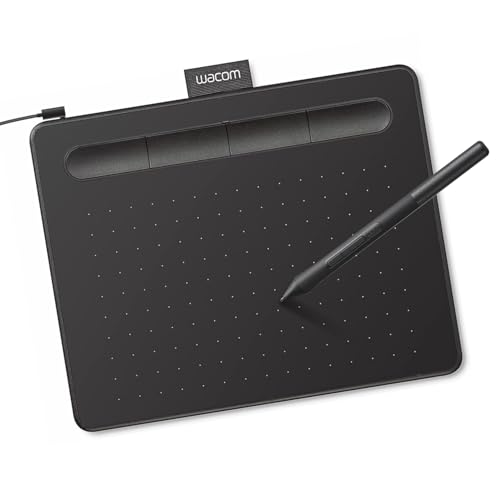
Wacom Intuos Small Pen Tablet, Wired, Black
Best screenless starter
Paid link · I may earn from it
- Screen
- None: 6.0 × 3.7 in drawing area, you watch your monitor
- Pen
- Wacom Pen 4K, 4,096 pressure levels, battery-free
A screenless pen tablet: a small drawing pad and a battery-free pen that work in any desktop art app. You draw on the pad while looking at your monitor, which takes some practice.
Not sure you will stick with digital drawing? The Intuos Small is the low-commitment way to find out. It has no screen: you draw on a 6.0 × 3.7-inch pad and watch your monitor. Wacom lists a battery-free 4,096-level pen, four ExpressKeys and support for Windows, macOS, ChromeOS and Android phones and tablets with OTG. It plugs into a plain USB-A port, so it works with computers that cannot drive a pen display.
Good fit if
- Trying digital drawing for a fraction of a pen display's cost
- Laptops and desktops without a video-capable USB-C port; it needs only a USB-A port
Skip it if
- You want to see the line under the pen; drawing while watching the monitor takes practice
- You draw large; the 6.0 × 3.7 in area is small, and the Medium is the bigger option
All maker specs
- Screen
- None: 6.0 × 3.7 in drawing area, you watch your monitor
- Pen
- Wacom Pen 4K, 4,096 pressure levels, battery-free
- Controls
- 4 ExpressKeys
- Connects
- USB-A cable to a computer
- Works with
- Windows, macOS, ChromeOS, some Android
Worth knowing
- A computer with only USB-C ports may need an adapter, per Wacom.
Specs are the maker's own figures from the product listing, not my measurements. Listing checked October 27, 2026 for this exact variant: Small, wired (USB-A), black, model CTL4100; the Bluetooth version (CTL4100WL, B079J2FSQ7) and the Medium are other options on the same page.How I pick
Hands-on: the paper tablet I draw in
One notebook I own and use, for anyone who searched for a drawing tablet but would rather keep a pen on paper. It is not a screen tablet: you draw in ink on a paper pad, and the page appears on a phone or tablet as you go.


HUION Note X10 Digital Notebook with Battery-Free Pen
$83.99List Price: $119.99Save 30%
as of Nov 3, 2026, 11:11 UTCDetails
Price and availability show on Amazon.
Paid link · I may earn from it
- Type
- Smart notebook: you write and draw on A5 paper in a folio; no screen of its own
- Pen
- Battery-free ink pen with ballpoint refills, 8,192 pressure levels (per listing)
Huion's smart notebook pairs a real ink pen and paper with live sync: what I draw on the page appears on my iPad as I go, and the battery lasts through 4–5 hours of continuous use.
Easy to use and quick to connect, and any paper works on its cover once the pad runs out, so I never worry about running out of paper. Photos and notes: my Huion Note X10 review.
Compare the specs
Five drawing tablets, makers' specs
| Set | Screen | Pen | Connects | Price | Shop |
|---|---|---|---|---|---|
| My pickHUION Kamvas 13 (Gen 3) Pen Display, Black | 13.3 in, fully laminated, anti-glare etched glass | PenTech 4.0, 16,384 pressure levels | USB-C to a computer (not standalone) | $229.00as of Nov 3, 2026, 11:26 UTCDetails | View on Amazon |
| XPPen Artist 12 (3rd Gen) Pen Display, Silver Grey | 11.9 in, 1920 × 1080, fully laminated, anti-glare etched glass | X4 stylus, 16,384 pressure levels, 60° tilt | USB-C or 3-in-1 cable to a computer or Android device (not standalone) | $209.99as of Nov 3, 2026, 11:21 UTCDetails | View on Amazon |
| HUION Kamvas 16 (Gen 3) Pen Display, Black | 15.8 in, 2560 × 1440, fully laminated, anti-glare etched glass | PenTech 4.0, 16,384 pressure levels, 60° tilt | USB-C or 3-in-1 cable to a computer (not standalone) | $459.00as of Nov 3, 2026, 11:21 UTCDetails | View on Amazon |
| Wacom MovinkPad 11 Android Drawing Tablet with Pro Pen 3 | 11.45 in, 2200 × 1440, anti-glare etched glass | Pro Pen 3 (slim), 8,192 pressure levels, 60° tilt | Nothing needed: Android 14 tablet, 8 GB RAM, 128 GB storage | $499.95as of Nov 3, 2026, 11:21 UTCDetails | View on Amazon |
| Wacom Intuos Small Pen Tablet, Wired, Black | None: 6.0 × 3.7 in drawing area, you watch your monitor | Wacom Pen 4K, 4,096 pressure levels, battery-free | USB-A cable to a computer | $39.95as of Nov 3, 2026, 11:21 UTCDetails | View on Amazon |
Specs that matter, and specs that do not
- Lamination and parallax. A fully laminated screen has no air gap between glass and display, so the line appears closer to the pen tip. This matters more than almost any other number.
- Surface. Etched, anti-glare glass adds a little paper-like friction and cuts reflections.
- Pressure levels. Beyond a few thousand levels, more is mostly marketing. What matters is how the pressure curve feels, which you can adjust in the driver. The Intuos’s 4,096 levels and the MovinkPad’s 8,192 are plenty to learn on.
- Color coverage. Near-full sRGB is plenty for illustration that ends up on screens. Print-focused work benefits from wider gamuts and a hardware calibrator.
- Resolution. 1920 × 1080 is fine up to about 13 inches; at 16 inches, 2560 × 1440 keeps lines crisp.
- Shortcut keys and dials. Mapping undo, brush size and zoom to physical controls speeds up work more than you expect.
- Size. 12 to 13 inches fits most desks and travels well. Artists who draw with big arm movements may prefer 16 inches or more.
Will it work with my computer?
This applies to the three pen displays. The MovinkPad needs no computer, and the Intuos needs only a USB port.
- Operating system. All three list Windows, macOS and Linux, and some Android devices; the XPPen also lists ChromeOS. Check the maker’s minimum version for your system: HUION Kamvas 13, HUION Kamvas 16, XPPen Artist 12.
- Video over USB-C. A single-cable USB-C connection needs a full-featured port that carries video (DisplayPort Alt Mode; HUION and XPPen both name USB 3.1 Gen 1 with DisplayPort 1.2). Many laptops have one; many desktops do not. If yours does not, the 3-in-1 cable takes video from an HDMI port instead. The Artist 12 and Kamvas 16 listings include both cables; the Kamvas 13 listing names one of the two routes as sold separately, so check before ordering.
- Android. Only phones and tablets that output video over USB-C (USB 3.1 Gen 1 and DisplayPort 1.2) can drive a pen display, per the makers.
- Not standalone. A pen display does nothing without a computer or compatible device. If you have neither, look at the MovinkPad.
Software to start with
- FreeKrita (painting and illustration) works with pen displays and pen tablets on Windows, macOS and Linux.
- PaidClip Studio Paint is popular for comics and illustration and runs on desktop and Android; Adobe Photoshop for photo-based work.
- Not availableProcreate is iPad-only, so none of these tablets runs it.
Setup tips
- Install the driver from the maker’s website, not a disc, so you get the current version.
- Calibrate the pen in the driver so the cursor sits under the nib.
- Map the dials to brush size and zoom, and a key to undo.
- Raise the stand to an angle that keeps your wrist neutral; long sessions flat on a desk strain neck and shoulders.
Questions
What is a drawing tablet with a screen called?
Usually a pen display; you will also see display tablet, drawing monitor or drawing pad with a screen. All mean a screen you draw on with a pen, connected to a computer. A standalone drawing tablet has its own operating system and needs no computer.
Is there a drawing tablet that feels like paper?
Etched anti-glare glass, as on the Kamvas and Artist 12 screens here, adds some paper-like friction. For actual paper, a smart notebook such as the HUION Note X10 I use lets you draw in ink on a paper pad while the page appears on your phone or tablet; it has no screen of its own.
Do I need a powerful computer?
No. Any computer that runs your art software smoothly and can output video to a second display will do. A standalone tablet like the MovinkPad needs no computer at all.
Can I use a pen display with a MacBook?
Yes. HUION and XPPen list macOS support for all three pen displays here. Check that your MacBook’s USB-C ports support video, which recent MacBooks generally do.
Is there a drawing tablet with a screen that works without a computer?
Yes. Standalone drawing tablets such as the Wacom MovinkPad 11 run their own operating system (Android, in its case) and include drawing apps. An iPad with a stylus is the other option.
Is 16K pressure better than 8K?
Few people can feel the difference. Lamination, a good pressure curve and a comfortable size matter more.
Screen or no screen for a beginner?
If you are coming from paper and the budget allows, a screen. Drawing where you look removes the biggest hurdle. A screenless pen tablet is the cheaper way to find out whether you enjoy digital drawing.
Looking for a gift for a digital artist? See gifts for artists.